Posts

Showing posts with the label Microsoft Dynamics AX

Dynamics AX Transaction scope and UserConnection class

We have done some customization in AX which perform insertion and updating data on multiple tables. It oftens fails and we have no clue where it fails so we decided to implement logging just for knowing how much steps are performed up till and if it fails where did we fails. We decided we will create separate table for logging and records every step in table which is about to performed so in this way we detail about steps. Normally we perform all activity in one transaction so if something fail whole process should be reverted but we want that our log should persists in table. There is a class UserConnection which exactly do what we wanted it to do. You just have to create its instance and on table just mention that it AX should use this new connection for this particular table. I am giving you an example.   static void SampleUserConnection_Job(Args _args) { VendTable vendtable; MyLogTable myLogTable; UserConnection userConnection = new User...
Dynamics AX 365 Tenanat Id

Many people ask how to find Tenant Id for their Dynamics 365. Actually it is very easy to find. 1. Go to site portal.azure.com .  2.  Go to Azure Active Directory. 3. Go to Properties. 4. Directory id is your tenant id Here is URL https://portal.azure.com/#blade/Microsoft_AAD_IAM/ActiveDirectoryMenuBlade/Properties

Number sequence XXXXXXX has been exceeded.

I have created some custom services to create Purchase Order, Sales Order etc. all the sudden its starting throwing error that Number Sequence exceeded. First i got confused because in Sales Order, Purchase Order number sequence there are still lot of numbers remaining and it can be exceeded. After doing some search it is found that its some other number sequence which limits is exceeded. Here are the step to find the exact Number Sequence which limit is exceeded. 1. Go to AOT -> Data Dictionary -> Tables -> NumberSequenceTable 2. Then find the Recid (5637145251) and get it number sequence code. 3 Then go to Organization administration -> Number Sequence, and then find and adjust the number sequence.

Dynamics AX 365 Create Main Account Using X++

DimensionServiceProvider class manages business logic for account. Following is the sample code how to create account using x++. DimensionServiceProvider dimensionServiceProvider; MainAccountContract mainAccountContract; MainAccountCategory mainAccountCategory; DimensionLedgerAccountType dimensionLedgerAccountType; ; ttsbegin; select firstonly mainAccountCategory where mainAccountCategory.AccountCategory == "CASH"; mainAccountContract = new MainAccountContract(); mainAccountContract.parmName("MyDemoAccount"); mainAccountContract.parmMainAccountId("0000001"); mainAccountContract.parmIsBlockedforManualEntry(NoYes::No); mainAccountContract.parmType(str2Enum(dimensionLedgerAccountType, "Balance sheet")); mainAccountContract.parmAccountCategoryRef(mainAccountCategory.AccountCategoryRef); mainAccountContract.parmLedgerChartOfAccounts("MyDemoLedgerChartOfAcco...

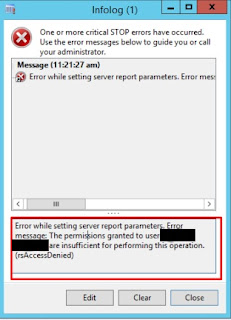
Error while setting server report parameters. Error message: The permissions granted to user are insufficient for performing this operation. (rsAccessDenied)

Image
When ever you receive this error when you try to open any  report "Error while setting report server parameters.Error Message The permissions granted to user are insufficient for performing this operation".   This is the permission issue means user does not have sufficient permission to access report. To give permission to user follow these steps. 1. Hold the shift key and click the mouse right click on the Internet Explorer. then select run as administrator. If you do not get option to run IE as administrator then go to C:\Program Files\Internet Explorer right click on "iexplore.exe" and choose run as administrator. 2.  Go to "localhost\reports" 3. Click The small arrow beside the DynamicsAX Folder them select Security 4. Click "New Role Assignment" 5. Type the domain and user name in textbox and select the Browse option and click on Ok button.    Open Dynamics AX and run report again.

Validate Date is Null

We often need to check check date time is null or not during coding. Dynamics AX provide global class which contains some helper methods one of them is datenull. You can use it compare date whether is null or not. Global::DateNull() There is another way to achieve it but this is not correct approach but it can be used. mydate != mkdate(1,1,1900) Here we are just checking date is set to minimum value  or not.

Dynamics AX 2012 Fast Full Compilation

Dynamics AX Full Compilation takes too much time to complete. From Dynamics AX 2012 R2 CU7 you can do full compile much faster with the help of AXBuild.exe. It runs in parallel executing on the AOS instead of AX client. You can found AXBuild.exe from this location. C:\Program Files\Microsoft Dynamics AX\60\Server\MicrosoftDynamicsAX\bin Open AXBuild.exe in command prompt and run full compile with following command axbuild.exe xppcompileall /s=01 /altbin=”C:\Program Files (x86)\Microsoft Dynamics AX\60\Client\Bin” /log:”C:\Temp”

Dynamics AX 2012 CIL Generation Error KeyNotFoundException

Today i faced the problem when run full compile. Dynamics AX give me error "The given key was not present in the dictionary". Quick fix is to see what is problem in log file "C:\Program Files\Microsoft Dynamics AX\60\Server\MicrosoftDynamicsAX\bin\XppIL\Dynamics.Ax.Application.dll.log". Log file will give the AOT object name which is creating problem, fix the error and compile to make sure no other error exists in AOT object.

SSRS Report Error "Parameter is missing a value"

Image
I was start getting error "Parameter is missing a value" when i left blank parameter of report. To make report parameter optional you have to follow these steps. 1. Open report in Visual Studio. 2. Go to Parameters and open the properties of your parameter.   3. Set Allow Blank to true. 4 Set Nullable to true. 5. Build and deploy the report. 6. In AOT, goto SSRS report and right click on your report and select Deploy Element. 7. Run your report.

X++ Get Start Date and End Date of Month

Use following methods to get Month Start Date and Month End Date. Pass any date of month in parameter. Month Start Date :    TransDate dateInMonth=today(); TransDate firstDateOfMonth; ; firstDateOfMonth = DateStartMth(dateInMonth); Month End Date : TransDate dateInMonth=today(); TransDate endDateOfMonth; ; endDateOfMonth= endmth(dateInMonth);

Unretreived Value In Form Field

Image
In Dynamics AX  2012 there is a problem in form data source that newly created field often not display data and "UnRetrieved" is display on the form. This error can be resolve by restarting AX or restating Dynamics AX 2012 service. When ever you crate new filed in table, you have to refresh the form so the new filed will be added in form datasource.

TTSCommit level

Image
Today i got this error when i try to run my code. Actually this error is telling that tts level in unbalanced and cant perform edit operations. To resolve this error this TTS level should be ZERO, Run this job to get rid of that error, this job will find the tts level where its greater than zero and make it zero by calling TTSABORT. tts b egin : marks the beginning of a transaction. This ensures data integrity, and guarantees that all updates performed until the transaction ends (by  tts c ommit  or  tts a bort ) are consistent (all or none). ttsCommit: marks the successful end of a transaction. This ends and commits a transaction. MorphX guarantees that a committed transaction will be performed according to intentions. static void TheAxaptaResetTTS(Args _args) { while (appl.ttsLevel() > 0) { info(strfmt("Level %1 aborted",appl.ttsLevel())); ttsAbort; } }

Calculate Age In Day, Months and Years in X++

I got required to display exact age of employee in days, month and years. I used some DateTimeUtil method and achieve my output. public static void getAge(Args args) { int years, months; int64 days; utcDateTime birthDayCurrentYear; str ageInWords; date _birthDate ; months = mthOfYr(systemdateget()) - mthOfYr(_birthDate); years = year(systemdateget()) - year(_birthDate); if (dayOfMth(systemdateget()) < dayOfMth(_birthDate)) { months--; } if (months < 0) { years--; months += 12; } #timeConstants birthDayCurrentYear = DateTimeUtil::addMonths(DateTimeUtil::newDateTime(_birthDate,0), ((years * 12) + months)); days = DateTimeUtil::getDifference(DateTimeUtil::newDateTime(systemdateget(),0) , birthDayCurrentYear) / #secondsPerDay; ageInWords = strFmt("%1 years, %2 months, days %3", years, months, days); info(ageInWords); ...

Business Connector Cache/Store Data In Memory

Image
During development in Dynamics AX 2009 and using business connector to get data from Dynamics AX i faced a problem that result were stored in cache and not reflecting the changes, to resolve this issue when i made changes on Dynamics AX i restart the AX service but after some time it stops working and it again not reflecting the changes, so i add following line of code in business connector code after logging in and it start working. Axapta ax = new Axapta(); ax.LogonAs(credentials.UserName, credentials.Domain, new System.Net.NetworkCredential(credentials.UserName, credentials.Password), null, null, null, null); ax.CallStaticClassMethod("SysFlushAOD","doFlush"); ax.CallStaticClassMethod(“SysFlushAOD”, “doFlush”);

Get Current User and Employe Infomation

Image
Retrieves the nonnumeric ID that represents the current user. curUserId(); Following function will return the name associated with the current user. XUserInfo::find(false, curUserId()).name; In order find out the employee linked to the current user. AX 2009: EmplTable::find(SysCompanyUserInfo::find(curUserId()).EmplId); AX 2012: HcmWorker::find(DirPersonuser::findUserWorkerReference(curUserId())).name();